


The naming convention creates immediate confusion: Coinbase is a centralized cryptocurrency exchange where the platform holds your private keys, while Coinbase Wallet is a separate, non-custodial application where you alone control your funds. Understanding this distinction is the first step in evaluating whether Coinbase Wallet meets your needs.
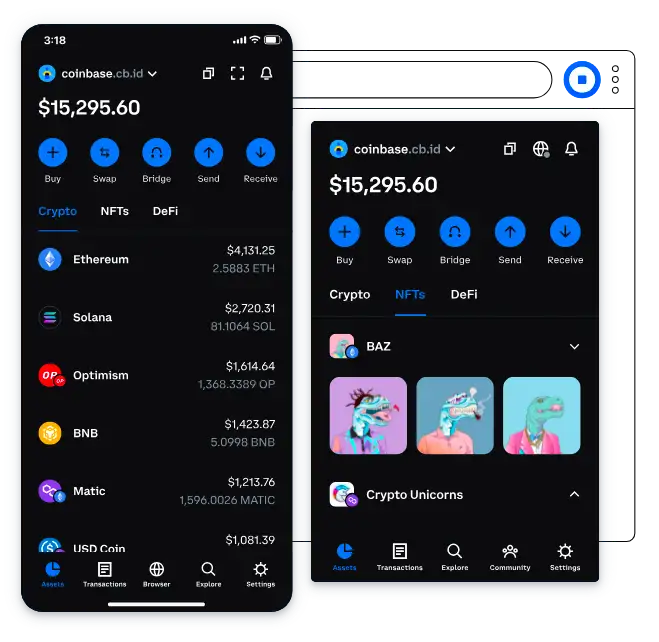
Coinbase Wallet functions as a self-custody wallet available as a mobile app (iOS and Android) and a browser extension (Chrome). It supports multiple blockchains, integrates a dApp browser, manages NFTs, and offers staking capabilities—all without requiring a Coinbase exchange account. You can use Coinbase Wallet entirely independently of the Coinbase platform.
After accumulating crypto from earning platforms, selecting the right self-custody wallet becomes an important decision. Whether you earn through FaucetWorld, which has operated for over seven years with multiple withdrawal options, or any other source, understanding how Coinbase Wallet handles security and accessibility helps you make an informed choice.
Coinbase Exchange vs Coinbase Wallet
This distinction deserves its own section because it is the source of most user confusion:
- Coinbase (Exchange): A centralized trading platform where Coinbase holds your private keys and manages your funds. Your account can be frozen, transactions reversed, or access restricted based on regulatory requirements. Funds held on Coinbase are custodial—similar to keeping money in a bank.
- Coinbase Wallet (Self-Custody): A non-custodial application where your private keys are stored locally on your device. Coinbase cannot access your funds, freeze your account, or restrict your transactions. If you lose your seed phrase, your funds are permanently inaccessible—no customer support can recover them.
You can link Coinbase Wallet to your Coinbase exchange account for convenient transfers, but the two products operate independently. Having a Coinbase exchange account is not required to use Coinbase Wallet.
Supported Blockchains and Assets
Coinbase Wallet supports assets across multiple blockchain networks, including:
- Ethereum and all ERC-20 tokens
- Solana and SPL tokens
- Bitcoin (via the mobile app)
- Polygon
- BNB Chain
- Avalanche
- Optimism and Arbitrum (Layer 2 networks)
- Base (Coinbase’s Layer 2 network)
The wallet supports over 2 million tokens and NFTs across these networks. Network switching is straightforward within the app, allowing users to interact with lower-fee chains like Polygon or Base without managing separate wallets for each network. For users accustomed to MetaMask’s manual network configuration, Coinbase Wallet’s built-in network support is a usability advantage.
dApp Browser and DeFi Access
Coinbase Wallet includes a built-in dApp browser that provides direct access to decentralized applications without leaving the wallet interface. This is particularly useful for interacting with DeFi protocols like Uniswap, Aave, and Compound, as well as NFT marketplaces and blockchain-based games.
What the dApp Browser Enables
- Token swapping: Trade tokens directly through integrated DEX aggregators
- Lending and borrowing: Supply assets to lending protocols to earn interest or borrow against collateral
- Liquidity provision: Add tokens to automated market maker pools
- NFT trading: Browse and transact on NFT marketplaces
- Staking: Stake supported assets directly through integrated protocols
The dApp browser includes bookmarking functionality and tracks your recent activity, making it easy to return to frequently used applications.
NFT Support
Coinbase Wallet provides native NFT management capabilities. NFTs held in the wallet are automatically detected and displayed in a dedicated gallery view. Users can send, receive, and view their NFT collections across supported chains, primarily Ethereum and Solana.
The wallet integrates with major NFT marketplaces, allowing users to list, purchase, and transfer NFTs directly. Token approval alerts and suspicious token detection features add a layer of protection against common NFT scams, such as malicious tokens sent to wallets to trick users into interacting with phishing contracts.
Staking Features
Coinbase Wallet offers in-app staking for select proof-of-stake assets. The most notable option is Ethereum staking, where users can earn rewards by staking ETH directly from the wallet. USDC holdings can also earn yield through integrated protocols, with rates around 4.1% APY depending on market conditions.
Staking through Coinbase Wallet differs from staking on the Coinbase exchange. On the exchange, Coinbase manages the staking process and takes a commission. In Coinbase Wallet, you interact directly with staking contracts, keeping full control of your assets while earning rewards. The trade-off is that you bear full responsibility for understanding the mechanics and risks of each staking protocol.
Security Architecture
Secure Element and Device Security
On mobile devices, Coinbase Wallet leverages the device’s Secure Element hardware for private key storage. This dedicated security chip encrypts and isolates sensitive data from the rest of the operating system. Combined with biometric authentication (fingerprint or face recognition) and passcode protection, the mobile app provides multiple layers of access control.
Cloud Backup Option
Coinbase Wallet offers an optional cloud backup feature that encrypts your wallet’s recovery data and stores it in your Google Drive (Android) or iCloud (iOS) account. This provides a safety net if you lose your device, but it also introduces a potential attack vector if your cloud account is compromised. Users who prioritize maximum security should stick with manual seed phrase backups stored offline.
Additional Security Features
- Suspicious token detection: Automatically flags potentially malicious tokens
- Token approval management: Review and revoke token spending approvals granted to dApps
- dApp revocation: Disconnect from dApps you no longer use
- Hardware wallet support: Connect Ledger hardware wallets for cold storage signing
- Encrypted messaging: XMTP-based messaging for Web3 communication
These security features place Coinbase Wallet in a competitive position. While it lacks the full desktop application experience of Exodus, its security toolset is more comprehensive than many browser-extension-only wallets.
Browser Extension
The Coinbase Wallet browser extension is available for Chrome and Chromium-based browsers. It functions similarly to MetaMask, allowing users to connect to dApps, sign transactions, and manage tokens directly from their desktop browser. Wallet settings and assets sync between the mobile app and browser extension when using the same recovery phrase.
The extension supports multi-wallet management, allowing users to create up to 15 separate addresses for Ethereum and Solana within a single wallet instance. This is useful for organizing funds by purpose—separating DeFi activity from long-term holdings, for example.
Fees and Costs
Coinbase Wallet itself is free to download and use. However, users should be aware of the following costs:
- Network gas fees: Standard blockchain transaction fees apply to all on-chain operations. These vary by network and congestion levels.
- Swap fees: Coinbase Wallet charges 0.5% to 1% on token swaps executed through its built-in aggregator, in addition to network fees and any fees charged by the underlying DEX.
- No monthly or subscription fees: The wallet does not charge recurring costs.
These swap fees are comparable to what other self-custody wallets charge, though users who perform frequent trading may want to compare rates across aggregators.
Frequently Asked Questions
Is Coinbase Wallet the same as Coinbase?
No. Coinbase is a centralized cryptocurrency exchange that holds your private keys and manages your funds on your behalf. Coinbase Wallet is a separate, non-custodial application where you control your own private keys. You can use Coinbase Wallet without having a Coinbase exchange account. Funds in Coinbase Wallet cannot be frozen or accessed by Coinbase the company, but this also means Coinbase cannot help you recover lost seed phrases.
Is Coinbase Wallet safe for storing crypto?
Coinbase Wallet uses Secure Element technology on mobile devices for private key storage, supports biometric authentication, and includes features like suspicious token detection and token approval management. It is a legitimate self-custody wallet with strong security foundations. However, as with any hot wallet connected to the internet, it carries more risk than cold storage solutions like hardware wallets. For significant holdings, pairing Coinbase Wallet with a Ledger hardware wallet provides the best of both worlds.
Can I stake crypto in Coinbase Wallet?
Yes. Coinbase Wallet supports in-app staking for select assets, including Ethereum and USDC. Staking through the wallet means you interact directly with on-chain staking contracts rather than going through the Coinbase exchange. Rewards vary based on the protocol and market conditions, with USDC yields around 4.1% APY as a reference point. You maintain full custody of your staked assets.
Does Coinbase Wallet support multiple blockchains?
Yes. Coinbase Wallet supports Ethereum, Solana, Bitcoin, Polygon, BNB Chain, Avalanche, Optimism, Arbitrum, Base, and several other networks. Over 2 million tokens and NFTs are supported across these chains. The app makes network switching straightforward, and you can manage assets on multiple chains from a single wallet without creating separate accounts.
Conclusion
Coinbase Wallet delivers a well-rounded self-custody experience with multi-chain support, a capable dApp browser, NFT management, and staking features. Its security architecture—leveraging Secure Element hardware, biometric authentication, and token approval management—is competitive with other leading non-custodial wallets.
The main caveat is the naming confusion with the Coinbase exchange, which can lead new users to misunderstand what the wallet does and does not provide. Once that distinction is clear, Coinbase Wallet is a solid choice for users who want direct control over their assets without sacrificing usability. For those with larger holdings, pairing it with a hardware wallet provides additional protection.
This review is for informational purposes only and does not constitute financial advice. Always conduct your own research before choosing a cryptocurrency storage solution.